
Manchester Half Marathon 2024: How to track runners as they head around the city - including on WhatsApp

The Manchester Half Marathon takes over the city on Sunday, October 13
Some 24,000 runners will take part in the event, which sees runners pass through areas of Manchester city centre and beyond. Plenty more people will be watching on and hoping the weather stays good for their runners.
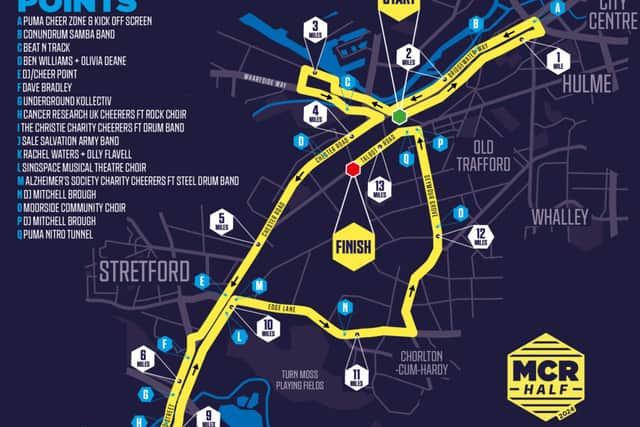
Keeping tabs on runners across the 13.1 mile route is tricky, and in some cases they may run past you in a flash. Like with previous years, race organisers have outlined ways people can track runners they know.
Phone apps are the easiest way to do this. Some of these apps will be built into phones and devices, whilst others can be downloaded ahead of the race day.
How to track runners using WhatsApp
Your runner can share their location via WhatsApp. They must first enable location permissions for WhatsApp in their phone’s Settings > Tap Apps > WhatsApp > Permissions > Location > Turn on WhatsApp. They can select from ‘Allow only while using the app,’ ‘Ask every time,’ and ‘Don’t allow.’
Once enabled, the individual can open an individual or group chat and tap Location > Share live location. They can then choose the amount of time and once done, those in the group can see a map with live location on the chat.

How to track runners using ‘Find My’ app on Apple devices
Apple phones have a ‘Find My’ app where you can link devices which are also Apple. To use this, ask your runner to open the Settings app, tap their name, then tap Find My. They then need to turn on Share My Location. Family Sharing is also an option only to share location with select participants.
How to track runners using Strava
Runners will be familiar with exercise tracking app Strava. The app has a feature called Beacon, and this offers the chance for location tracking. Your runner must start a new run on Strava and tap the Beacon icon in the lower right. They then pick up three safety contacts who will receive their location during the event. An orange dot will then indicate when Beacon is active and give an accurate GPS location which supporters can see on their app.